
Share on social..
By Richard McBarnet, Managing Director, Lumina Technologies
If your engineers are still walking USB sticks from the design office to the shop floor to load jobs onto your CNC machines, you already know the problems it creates.
It works. But it’s not secure, it’s not efficient, and if you’re working toward Cyber Essentials certification, it’s creating risks you’ll need to address.
There’s a better way.
 Most people don’t realise that the operating system inside a CNC machine isn’t a standard version of Windows. It’s an embedded version — separately licensed, built specifically for machines with computing cards and processing power. But if you log into one, it looks like a Windows PC. And that’s when people get a surprise.
We’ve seen machines running Windows 7, Windows XP, even Windows NT4 — which takes us back to the late 1990s.
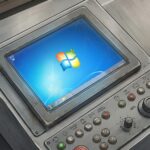
If you bought a new CNC milling machine today, it would probably come with Windows 10 or Windows 11 embedded. But Windows 10 is already end-of-life from a PC perspective, and even for embedded systems, vendor-supported updates only last so long. Eventually the vendor stops issuing updates and the machine carries on working with whatever system it has.
And just as with PCs, you can’t shoehorn a modern operating system onto older hardware. Windows 11 is very specific about the processor, the TPM chip, and the memory requirements. Upgrading these machines to a modern operating system is simply a non-starter. It can’t happen.
But equally, businesses aren’t going to throw these machines out. They still have all the technical capability to deliver the function they were designed for. So, we have to find an alternative solution.
The first thing most businesses think of is air gapping — just unplug the machine from the network entirely. If it’s not connected, it can’t be compromised, and from a Cyber Essentials perspective it’s effectively taken out of scope.
That’s true, up to a point. An air gap does provide a clear, non-bridgeable boundary between the internet and the machine. It absolutely solves the cyber exposure problem.
But the consequence is that your engineers now need to use some form of transportable media to transfer work onto the machines. In practice, that means USB sticks, maybe a USB hard drive. And because of the age of these machines and their inability to deal with encrypted drives, they’ll be using unencrypted devices. A fresh USB stick straight out of the packet, loaded with the job from the design office, then carried over to the machine on the shop floor.

The inherent risk is obvious. Any time you have an unencrypted device that’s physical and portable, you run the risk of it being lost, mislaid, put in a pocket and forgotten about, taken home. You have no control over the data. You’re not creating any security boundary around it.
So, the air gap solves the internet problem but creates a data security problem. You’ve moved the risk from A to B.
The logical next step is to encrypt the USB drives. But for most legacy CNC machines, that’s a non-starter too. The machines are too old to decrypt or open the encryption at the other end. So, you’re stuck — air gapping forces you into USB sticks, and the USB sticks can’t be made secure because the machines can’t handle encryption.
We still need a better solution.
The best solution — and the one that effectively ticks every box — is a segregated network.
What we do is create a separate network, or VLAN (a virtual local area network), and isolate it from the internet. There’s absolutely no internet connectivity to or from that VLAN. It’s the virtual equivalent of the air gap we had before.
But because it’s electronic and we can manipulate it, we can create controlled routes from that segregated network to the workstation network or server network — wherever the design files are stored. Those routes only exist between those two zones. So a workstation in the design office can access both the internet and the segregated machine network — but through completely separate routes. The internet connection never reaches the isolated machines. They’re connected to your internal network, but sealed off from everything else.
By managing that segregated network separately, managing all the security boundaries around it, and using access control lists to determine who can access it, we create the equivalent of an air gap without pushing engineers to use USB sticks — which just creates a secondary problem.
The machines receive their G-code and design files electronically, directly from the design office. No USB sticks. No unencrypted data walking out the door. No version control headaches. The problem is solved completely.
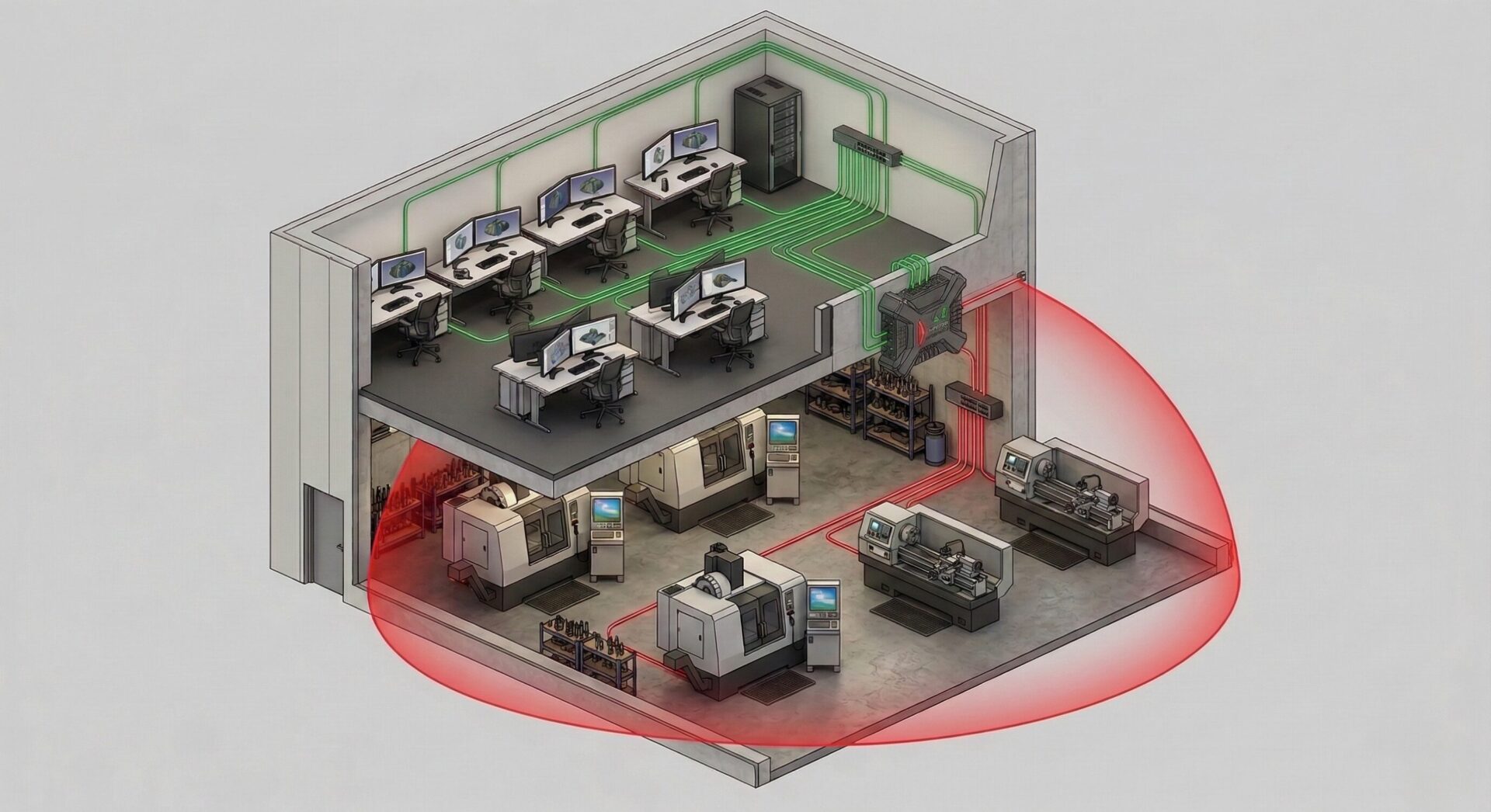
From a Cyber Essentials perspective, these machines are taken out of scope — which the certification framework allows for legacy hardware with operating systems that can’t be updated. But the key point is that you’ve achieved this without air gapping, without USB sticks, and without compromising how your engineers work.
For anyone running legacy hardware or machines with legacy operating systems or firmware, segmenting the network your CNC machines are on, is the only sensible, viable route to go down.
– Richard McBarnet, IT Expert & Lumina CEO

If you’re running legacy CNC equipment, or your engineers are still using USB sticks to load jobs, or wondering whether Cyber Essentials is achievable for your business, we can help you find out. Contact us via the contact form on the side, or call 01442 500 890 for a free IT review of your legacy machinery.

Lumina Technologies have taken the time to understand the requirements of our business and work as our strategic IT partner, enabling us to concentrate on delivering a high quality service to our clients and focus on our growth strategy. They have delivered a 100% cloud solution to our business with no underlying infrastructure costs or maintenance, which gives us scalability for our planned growth. It also means our business critical applications and data are securely accessible from virtually all our user devices. Lumina’s professional approach and strategic expertise is highly valued and their management of our IT – based on their in-depth knowledge, leaves us confident that our systems are available 24×7.
Luke Harrison
Keidan Harrison LLP

The quality of IT Support provided by Lumina Technology is of the highest standard and is complemented by effective client liaison with impressive response times. Trap Oil Group plc has no hesitation in recommending Lumina as a dedicated and specialist group of IT professionals.
Martin David
Technical Director, Trap Oil Group plc

Richard and his team are a real inspiration to anyone who meets them and I have watched Lumina’s growth over the last few years with interest and admiration. Richard has been an amazing supporter of the Hospice of St Francis, being a Gold member of the Corporate Partner Network for almost two years. He takes an active interest in the community and is passionate about his company and his town: nothing is too much trouble, he is always willing to help, to give up his time and to provide business advice when asked. Lumina is an inspiration to any company wanting to set up business in Hertfordshire.
Carolyn Addison
Corporate Fundraising Manager, The Hospice of St Francis

Lumina Technologies Prism Hosted Desktop has allowed our business to centralise our global corporate data, allowing much faster access for all our staff – regardless of their location. We have also been able to simplify and reduce our infrastructure and management overhead. With the new Prism Hosted Desktop solution all staff now have simple and secure access to corporate data using any device they choose. Prism Hosted Desktop has increased the productivity of our staff and given us a single, consistent and familiar experience for all users from any device, in any location, 24/7.
Katherine Roe
Chief Executive Officer, Wentworth Resources PLC

The commercially sensitive and regulated nature of Lambert Energy Advisory’s business requires an IT provider able to maintain the highest levels of integrity and confidentiality, Lumina Technologies has consistently been unimpeachable in this regard over the nine years we have employed them.
Patrick Agar
Lambert Energy Advisory

It has been a great pleasure working with Lumina Technologies over the past two years. They have fully committed to being involved in the local community with volunteering and with professional advice and commitment, helping many local charities along the way. As a growing company it proves that being involved in the local community is helping them attract and retain a talented workforce and I look forward to working with them well into the future.
Cindy Withey
Connect Dacorum

Hawkstone Management Services Ltd is a small company for which IT Outsourcing is realistically the only viable option. Lumina Technologies have successfully performed this role for over fifteen years. They also provide innovative solutions to keep pace with technological progress. I would have no hesitation in recommending Lumina to similar sized businesses.
Stephen Pembury
Hawkstone Management Services Ltd

Charles Douglas Solicitors LLP have been using Lumina Technologies for a number of years now and continue to be impressed by the technical know-how and contemporary knowledge of their senior management, who provide a timely, efficient and friendly service. Whether it is a small issue with one computer, or a strategic IT decision, they maintain a current knowledge of available technologies. Lumina are always at the other end of the phone to help resolve issues and minimise business interference. The technical knowledge of Richard and his senior team means that there has not been a problem that they can’t solve to date. I am sure we will continue to use them in the years to come.
Charles Douglas
Managing Partner, Charles Douglas Solicitors LLP

The team at Lumina Technologies have made the Amoun Travel & Tours office IT transition seamless and problem free. The office set-up has been vastly improved and the IT Support services are flawless. No issue goes unresolved, which is extremely reassuring.
Adam Helmy
Amoun Travel & Tours Ltd

Lumina Technologies has been Salamander Energy plc’s IT provider since start-up in 2005 and has supported us in London during our expansion across operational offices in SE Asia. Their professional approach, strategic advice and close co-operation have been essential in making this a success.
John Bell
Group Technical Director, Salamander Energy plc

Richard and his team at Lumina have provided Perrett Laver Limited with high quality strategic and practical IT Services for over ten years. During this period, Perrett Laver has grown from 10+ colleagues based in London to nearly 100 colleagues located in six offices across the Americas, EMEA and Asia-Pacific. Richard and the Lumina team have not just been responsive to our ‘everyday’ IT needs, but have proactively sought to work with us on developing an infrastructure suitable for the type of operation we are today, and are planning to be months and years down the line. I would not hesitate to recommend Richard, especially for small to medium size business with growth in mind.
Clementine McKinley
COO, Perrett Laver Limited

Society Limited has been supported by Lumina Technologies since our earliest start-up phase. From large logistical challenges like an office move, through to smaller fiddly issues like fixing a faulty e-template, we know we can count on their support and advice. They’ve also been able to engage with us strategically on the challenge of scaling-up our infrastructure as the firm continues to grow and evolve. We always feel confident going to Lumina with a problem, since we know they genuinely care about sorting things out and helping us to get on with our core business.
Simon Lucas
Managing Director, Society Limited
The Vita Group HQ staff have worked with Richard McBarnet and Lumina Technologies for over 9 years, with Lumina providing all our PC, server, phone, and software support. The services have included C-level executives based in London, Manchester, the US, as well as supporting home office IT as well. The service provided and intellectual capabilities are outstanding and we would highly recommend Richard and his Lumina team.
Joe Menendez
CEO, The Vita Group
We worked with Lumina on a GDPR Audit. Richard was knowledgeable and professional throughout, and did the best he could to bring a dry topic to life through lots of real life examples and analogies. We were so impressed with the service Lumina provided and the value we got from partnering with them on this project – we couldn’t recommend them enough.
Holly Cottingham, Vintec Laboratories

We were trying to do everything in house, and were spending too much time troubleshooting and figuring tech issues out ourselves. We just needed a knowledgeable partner that could take care of that for us. Since joining, we’ve been so well supported by Paige and the Lumina team. It’s really validated the decision to engage an IT partner, and we’re glad it’s with Lumina.
Bruce Storey
Chief Operating Officer, Estu Global Ltd

Thanks to you and all the team for your help over the past year – it has been the most pleasant and stable IT year since we began in 2009!
Trevor Cullen
Managing Director, Innovelec Solutions Ltd